
Audiobook Organizer
Download for Windows
Audiobook Organizer 0.9.3 release candidate. Windows 10 / 11, x64.
Download documentation updated: October 23, 2026. Application package unchanged.
ZIP · 34.4 MiB · No installer, Python or FFmpeg setup required.
Release notes and version history for the current 0.9.3 candidate. These documentation notes do not change the downloaded application.
Start in three steps
- Download the ZIP to a local folder.
- Right-click it and choose Extract All.
- Open the extracted AudiobookOrganizer folder and double-click AudiobookOrganizer.exe.
Do not run the EXE inside the ZIP viewer. Keep the _internal folder beside the EXE; do not copy the EXE on its own. Ordinary use does not require administrator permission.
First run: Windows SmartScreen
The current application is unsigned. Windows may show Windows protected your PC because it does not recognize this app or its publisher. A reputation warning does not, by itself, say that malware was found; it is also not proof that the file is safe.
Use the steps below only for the Audiobook Organizer ZIP downloaded from this website, after checking the filename and published SHA-256 checksum. If the message is only the unrecognized-app notice and you trust the source, you can decide whether to use Windows' optional controls:
- Select More info.
- Check that the app is AudiobookOrganizer.exe. This unsigned release will show Unknown publisher.
- If you choose to proceed, select Run anyway. You can instead choose Don't run and stop.
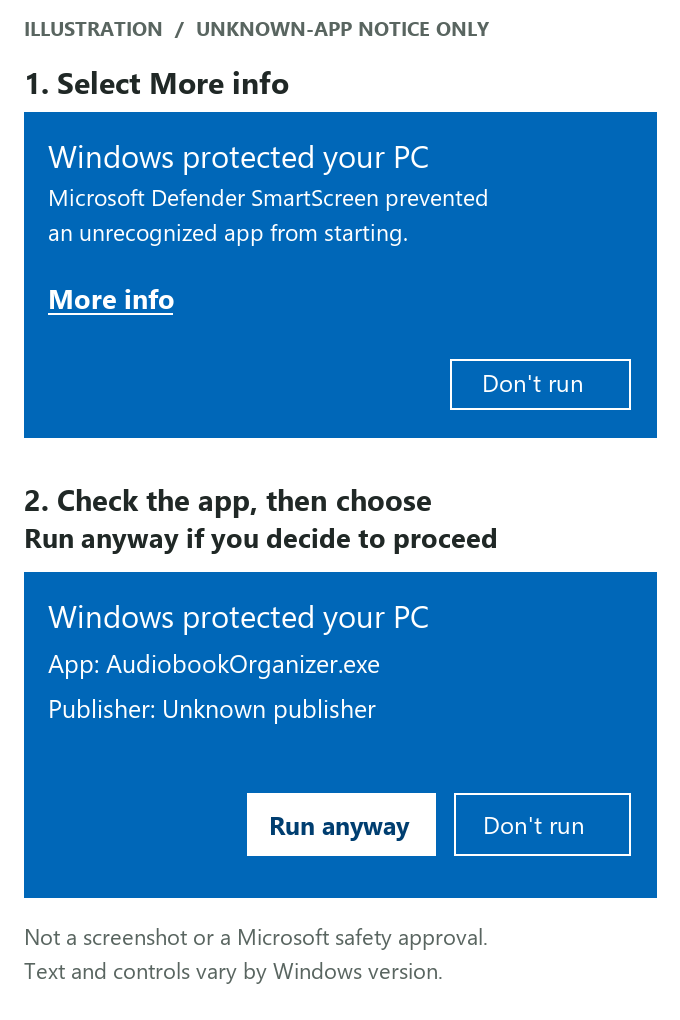
Stop if the message is different. If Windows or your antivirus identifies a threat, the checksum does not match, or an administrator policy blocks the app, do not follow these steps. If Run anyway is unavailable, do not work around the restriction. Never disable Defender, SmartScreen or antivirus protection, add an exclusion, or remove the file's security markings to run this application. Contact [email protected] with the exact message if you need help.
Try before purchasing
The free edition exports up to 30 minutes per book. It includes importing, chapter editing, cover and book information, and source preview. No card or account is needed. A purchased Creem license unlocks longer exports on two computers; only first activation needs internet access.
Follow the three-step guide to making a chaptered M4B.
Updates and existing licenses
Close Audiobook Organizer, extract the complete new ZIP to a new local folder, then run that version under the same Windows user. Do not mix files from different versions. The ZIP and installed edition share user data at %LOCALAPPDATA%\Audiobook Organizer; leave that folder in place to retain activation and settings. Keep original audio and saved projects.
No setup or automatic shortcut is provided. To remove this edition, close it and remove its extracted program folder after backing up your work. A new Windows installation or different Windows user needs online activation. Test-version licenses do not activate this release.
Windows safety
This release candidate is unsigned. Windows can show Unknown publisher or block it under reputation or organizational policies. The first-run guide explains the optional controls for an unrecognized-app notice only. Do not disable protection or work around a malware detection or administrator restriction. Contact [email protected] with the exact message. Previous-version testing and scans do not certify every newly built package.
File integrity
ZIP SHA-256:
b514daed51d7c523ad73ee76770262d02667634df2476aa6f56a7c0497e9646a
A matching checksum detects changes; it is not a digital signature or a guarantee that a file is safe.
Third-party components and source
The application remains proprietary. FFmpeg is included as a separate LGPL-2.1-or-later command-line program. Required notices and license texts are included in the ZIP. The exact corresponding engine source, patches and build instructions are available without purchase:
Download matching FFmpeg source and build materials
The source archive covers the distributed audio engine, not proprietary application code. Third-party open-source rights are unaffected by the software license.
Known limits
Conversion is lossy AAC. Some audiobook players display metadata differently. No full Apple Books, all-player or all-hardware certification is claimed. Large books require temporary disk space. See the FAQ and included English guide.